Extension Whitelist
Extensions can be restricted by only allowing certain extensions to be installed and loaded into Rapidminer® AI Studio software.
The keys of these extensions are added comma separated to the rapidminer.extensions.whitelist property.
Usage
# Only allow shipped extensions and the operator toolbox
rapidminer.extensions.whitelist=shipped,rmx_operator_toolbox
Extension keys
Extension keys can be found using the search on Marketplace. The extension key can be found at the end of a extension detail page URL.
https://marketplace.rapidminer.com/UpdateServer/faces/product_details.xhtml?productId=rmx_text
Here the extension key is rmx_text
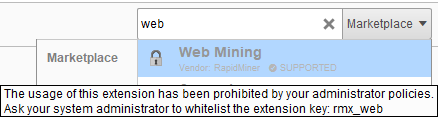
Alternatively, inside Rapidminer AI Studio the key will become visible if extensions are blocked searched for using the global search:
Keywords
Beside the extension keys there are also keywords that can be used
none
Only allows packaged extensions:
advanced_file_connectors,concurrency,jdbc_connectors,legacy,productivity,professional,remote_repository,blending,utility,browser,html5_chartsThis setting can not be combined with other keywords or extension keys.
shipped
This allows all extensions that come with every Rapidminer AI Studio installation. All packaged extensions plus:
model_simulator,process_scheduling,social_media,cloud_connectivity,h2o,dataeditor,model_deployment_management,operator_recommender,time_series