Rapidminer AI Hub Server Overview
Rapidminer AI Hub Server is a performance-optimized application server where you can schedule and run your analytic processes and quickly return your results. It seamlessly integrates with not only Rapidminer® AI Studio software, but other enterprise data sources as well, allowing processes to continually update so that they reflect any changes to external data sources. With shared repositories and version management, contributors throughout your organization can — locally or remotely — collaborate, build interactive apps, and visualize results using HTML5 charts and maps.
Understanding the general infrastructure
There are several main components to a Rapidminer AI Hub Server configuration:
| Component | Description |
|---|---|
| Rapidminer AI Studio | Rapidminer AI Studio is where you build and edit analytic processes. Rapidminer AI Studio and Rapidminer AI Hub Server connect and interact with each other, employing standard protocols. For each instance of Rapidminer AI Hub Server, you can connect one or multiple Rapidminer AI Studio clients. |
| Rapidminer AI Hub Server | Although it is a separate application and requires a separate license, Rapidminer AI Hub Server depends on Rapidminer AI Studio for operations. While you can run a process from Rapidminer AI Hub Server, if you want to edit or change a process, you must make those changes through Rapidminer AI Studio. Rapidminer AI Hub Server utilizes a home directory as a central place for server configuration and project content. |
| Rapidminer AI Hub Job Agent | Job Agents are responsible to orchestrate execution on a node they are deployed. After an agent is running and connected to a queue it will start Job Containers whenever a process is available on the queue. |
| Rapidminer AI Hub Job Container | Job Containers are responsible to execute a process. Their lifecycle is managed by the Job Agent which started them. |
| Rapidminer AI Hub Server Projects | Also accessible from Rapidminer AI Studio, the Rapidminer AI Hub Server project contains the Rapidminer AI Hub Server processes and data. This content is stored within the home directory of Rapidminer AI Hub Server. |
| Data sources | The individual user data sources, for example, those used for model building. Connections allow you to connect to databases or to connect to other data sources. Best practice suggests that you configure both Rapidminer AI Hub Server and Rapidminer AI Studio with access to the data source. Connections to the data sources are used when building processes with operators such as Read Database or Write Amazon S3. |
| Operations database | The Rapidminer AI Hub Server database stores configuration files, cron job details, you created report requests, and other internal Rapidminer data. The database is part of the Rapidminer® AI Hub software deployment and is not managed by the user) |
| Keycloak | The internal Keycloak service, which is responsible for user and group management. All users and groups used by Rapidminer AI Hub Server are retrieved from this service |
| Keycloak database | The Keycloak database stores configuration, users and groups. The database is part of the Rapidminer AI Hub deployment and is not managed by the user) |
| Broker | The broker is the part of the deployment, which is responsible for managing queues between the components. It is part of the deployment and not manged by the user. |
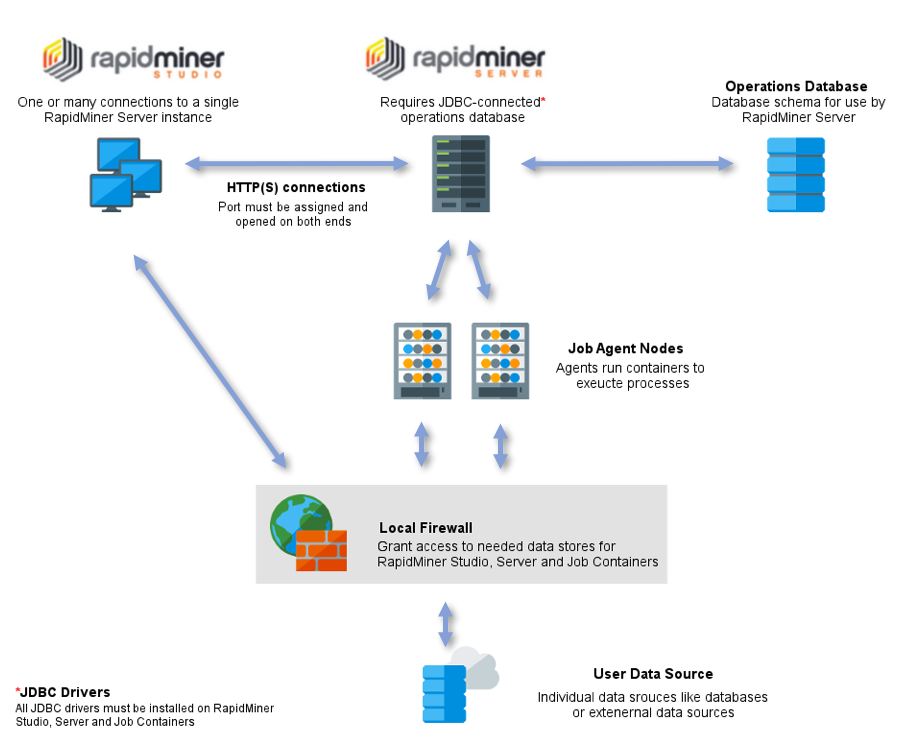
Rapidminer AI Studio and Rapidminer AI Hub Server communicate via HTTP(S); you must assign and open the communication port on each instance in the configuration. Although true for any configuration, in the case of multiple clients, access rights management is particularly important for preventing unauthorized user access to repositories.
Rapidminer AI Hub Server and Job Agents
Rapidminer AI Hub Server outsources execution to an external entity called Job Agent. It does so by creating asynchronous queues to which it allows these agents to connect to.
Agents receive process messages via these queues and send back information about their own status, the status of the processes they are executing and process logs if requested. A Job Container
is spawned before each process execution, these containers run in their own JVM as a standalone OS process. The JVM terminates once the process has finished executing. To learn more about Job Agents, you can read the page
Installation > Job Agents, or read the README.md file inside the agent distribution.
Job Agents do not pick up existing executions in case they go down unexpectedly and boot up again. These executions have to be terminated manually by the administrator.
Using the Rapidminer AI Hub Server projects
The Rapidminer AI Hub Server projects, as with the local Rapidminer AI Studio projects, contain processes and data. This content is stored within the home directory of Rapidminer AI Hub Server. Some details:
When you open the
 Rapidminer AI Hub Server project in the Repository view of Rapidminer AI Studio, the platforms collaborate, making the data and process available to both applications.
You create processes in Rapidminer AI Studio and then save them to the
Rapidminer AI Hub Server project. They are available from both platforms.Those processes reference data sources, which can exist directly in the Rapidminer AI Hub Server project, or can be referenced by connections that are used in operators.
Use the Rapidminer AI Hub Server project in the same way as you use the Rapidminer AI Studio local project, although additionally, with correct permissions, users can share content.
Connecting to data sources
You can assign appropriate access rights instead of individually configuring those connections for each user on Rapidminer AI Hub Server.
Rapidminer AI Studio accesses a data source directly and must have access to the data through any local firewalls. Rapidminer AI Hub Server may access the data source directly or through Rapidminer AI Studio and also needs firewall access.
Both Rapidminer AI Studio and Rapidminer AI Hub Server need to have any JDBC drivers that you use for a database connection. If you are using a driver that is not packaged with Rapidminer AI Hub software, install it on both platforms.
See the section on creating connections for complete details.